Website performance can make or break the user experience. Slow load times often trace back to two main culprits: your site’s code and your server or network speeds.
While infrastructure issues like hosting and bandwidth matter, overlooked inefficiencies in your code or database interactions are common hidden bottlenecks. Slow queries, unoptimized scripts, and poorly structured calls to databases can grind your site to a halt—even on robust servers.
This guide focuses on actionable ways to diagnose and improve code-level performance. We’ll walk through identifying sluggish code execution and pinpointing slow database calls, so you can speed up your services and keep your visitors engaged.
Optimizing WordPress Performance: Tools to Diagnose Slow Code
If you suspect your WordPress site is underperforming due to code-level issues, there are built-in and plugin-based tools to help you diagnose the problem without needing deep technical expertise right away.
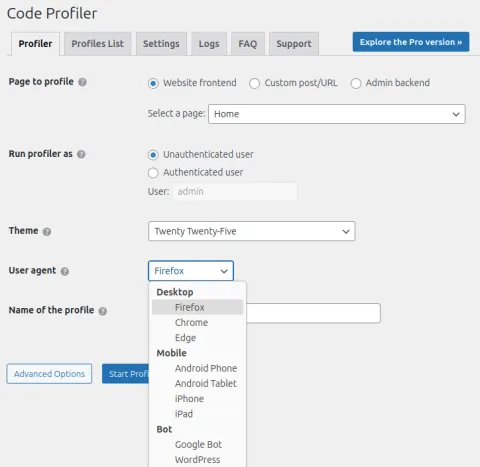
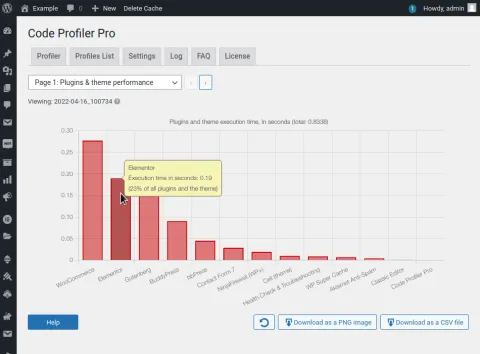
For a straightforward overview, we suggest installing the plugin Code Profiler, which offers a simple way to review your code, plugins, and themes. The free version provides enough insight for most users to identify common bottlenecks. It generates performance graphs showing the load times of your plugins and themes—each should typically be well under a second unless intentionally high for a specific function. The tool also includes a basic disk speed test, giving you a snapshot of your server’s responsiveness.
For those needing a deeper look—especially into slow database queries—a dedicated plugin like Query Monitor is invaluable. It provides a clear, detailed view of every database call, highlighting which queries are slowing down your site. While incredibly powerful, interpreting its data can require a more skilled eye to isolate and resolve complex issues.
Using these tools in tandem can help you move from noticing a slowdown to understanding its cause, whether it’s a bloated plugin, a slow theme, or inefficient database requests.
Drupal
Other